Quickstart
Improve your flexibility products with our powerful APIs.
Our APIs empower you to seamlessly integrate our virtual energy management solutions into your systems, enhancing the delivery of flexibility services to your customers.
This guide will help you get started with integrating our energy management solutions into your applications. Follow the steps below to understand how to authenticate, obtain an API key, and make your first API call.
Introduction
Our platform supports various functionalities, including smart meter data retrieval, baseline forecasting, event management, consent handling, and detailed analytics.
By leveraging our APIs, you can:
-
Access and analyze energy data from smart meters.
-
Predict and manage energy demand and flexibility events.
-
Handle user consent for energy dispatch events.
-
Integrate comprehensive energy analytics into your applications.
Authenticating
To ensure secure access to our APIs, you must authenticate your requests using an API key. This key is unique to your account and allows our system to verify your identity and grant access to the requested resources.
Steps to Authenticate
-
Obtain an API Key: Follow the instructions in the "Get an API Key" section below.
-
Include the API Key and Tenant UUID in Requests: Once you have your API key and Tenant UUID, include them in the header of your HTTP requests.
Example
Here's an example of how to include the API key in your request header:
GET /api/example/endpoint
Host: cloud.equiwatt.com
x-api-key: [YOUR KEY GOES HERE]
tenant: [YOUR TENANT UUID GOES HERE]
x-api-version: 1.0
API Versioning
The API is versioned and and version needs to be included in the header using X-API-Version
Example
GET /api/example/endpoint
Host: cloud.equiwatt.com
x-api-key: [YOUR KEY GOES HERE]
tenant: [YOUR TENANT UUID GOES HERE]
x-api-version: 1.0Supported API Versions are: 1.0
Get an API key and Tenant UUID
To use Equiwatt's APIs, you need to obtain an API key. This key is necessary for authenticating your API requests.
Steps to Get an API Key
-
Contact Us: Contact us at hello@equiwatt.com to get setup & receive your test API Key and Tenant UUID.
Environments
Sandbox
We have a sandbox environment that helps you while you develop your service with less resources than the production environment. Please note that some of the URL endpoints in the sandbox environment return mock data for testing purposes.
Please use the sandbox environment for testing only while developing.
|
BaseURL https://sandbox.equiwatt.com/ |
|---|
Webhooks
equiwatt API supports webhooks to deliver realtime information to your system. To enable webhooks you need to use the Webhooks API to subscribe to different event types supported by equiwatt API.
Webhook types
Following webhook types are supported in equiwatt API. Check the Webhook create section in the API reference on how to subscribe an URL to event types.PORTFOLIO.ASSETS_ASSIGNED - Fired when assets are assigned to a portfolio.EVENT.PORTFOLIO_ASSIGNED - Fired when a portfolio is assigned to an event.EVENT.SCHEDULED - Fired when an event is scheduled.EVENT.STARTED - Fired when an event has started.EVENT.ENDED - Fired when an event has ended.EVENT.CANCELLED - Fired when an event has cancelled.EVENT.BASELINES_READY - Fired when new baselines are ready for an event.EVENT.STATS_CALCULATION_STARTED - Fired when stats of an event are started calculating.EVENT.STATS_READY - Fired when stats of an ended event is ready.ASSET.MPAN_VALIDATED - Fired when a SMARTMETER MPAN number has been validated.EVENT_SCHEME.ASSETS_UPDATED - Fired when Event Scheme Assets are verified/checked with the Regulator (ex: National Grid).
Once you subscribe to events and recieve a webhook UUID you can test it using the Webhook test API endpoint.
Authentication
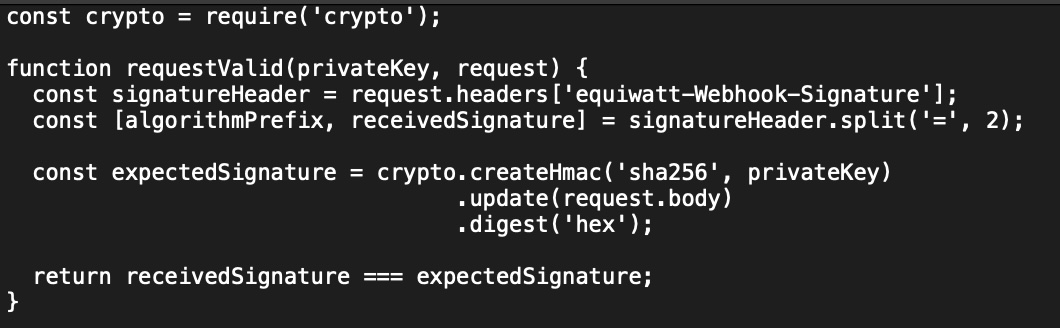
When you subscribe to webhook events you receive a webhook secret (private key). We use this secret along with the webhook payload to calculate a HASH based signature that you can use to determine the authenticity of the webhook request. This signature is included in a header called equiwatt-Webhook-Signature as equsha256={signature} . See below example.

The signature is computed by getting the HMAC-SHA256 hash of the JSON request payload using the webhook secret as the key.
You need to calculate the same signature and compare it to the signature sent by equiwatt API for securing your webhook handlers.
A Verification example using JavaScript
Webhook events: Request body (JSON) examples (HTTP POST)
EVENT.SCHEDULED:
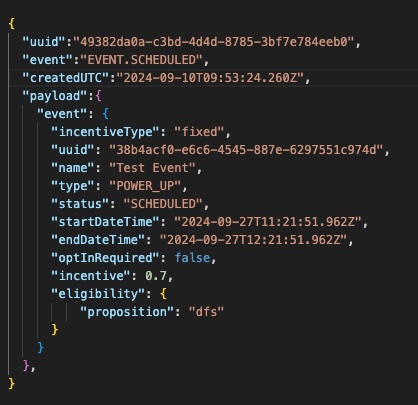
EVENT.STARTED, EVENT.ENDED, EVENT.CANCELLED, EVENT.STATS_CALCULATION_STARTED, EVENT.STATS_READY, EVENT.BASELINES_READY:

EVENT_SCHEME.ASSETS_UPDATED:
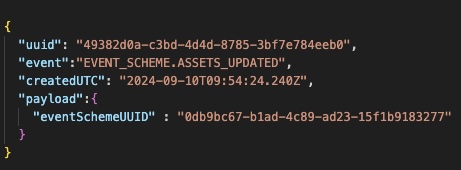
Event Scheme Asset Statuses
OPT_IN - Opt In to a Scheme.
OPT_OUT - Opt Out from a Scheme.
DUPLICATED - Asset may have registered with multiple providers.
REJECTED - Regulator has rejected the asset from participating in events under the scheme.
READY - Asset is validated and ready to participate in events under the scheme.
Request body properties
|
Property |
Description |
|---|---|
|
|
Unique UUID of the webhook |
|
|
Type of the webhook event |
|
|
Timestamp when the event has happened |
|
|
Details of the main resource that the event (webhook event) is referring to |
List Requests
A response for a list request is paginated, meaning you could pass the page and pageSize query string parameters in the request URL. The default page is 1 and pageSize is 10 if you do not specify these parameters. The maximum number of items per page (pageSize) for a request is 1000. If you try to send a request with pageSize greater than 1000, it will result in a Bad Request (400) error.
Sample request
api/v1/assets?page=1&pageSize=100
Limitations
Our API allows you to send 25 requests per second and 15 concurrent requests.
Create Energy Consumption: Create energy consumption endpoint supports up to 50000 records per request. Hence below limitations are in place for this end point specifically.
1 request per second and 1 concurrent request.
Please contact us If you need to increase the above limitations.